This is default featured slide 1 title

Go to Blogger edit html and find these sentences.Now replace these sentences with your own descriptions..

Apple MacBook Pro

Stunning Retina displayMillions of pixels ahead of its time.One look and it's clear: with over 4 million pixels on the 13-inch model and over 5 million pixels on the 15-inch model, the Retina display on MacBook Pro is an incredible engineering feat. Whether you're retouching professional protography or editing a home in HD.

This is default featured slide 2 title

Go to Blogger edit html and find these sentences.Now replace these sentences with your own descriptions..

This is default featured slide 3 title

Go to Blogger edit html and find these sentences.Now replace these sentences with your own descriptions..

This is default featured slide 4 title

Go to Blogger edit html and find these sentences.Now replace these sentences with your own descriptions..

This is default featured slide 5 title

Go to Blogger edit html and find these sentences.Now replace these sentences with your own descriptions..

Tuesday, August 13, 2013

GRUB Customizer 3.0 Released: Install It In Ubuntu 12.04


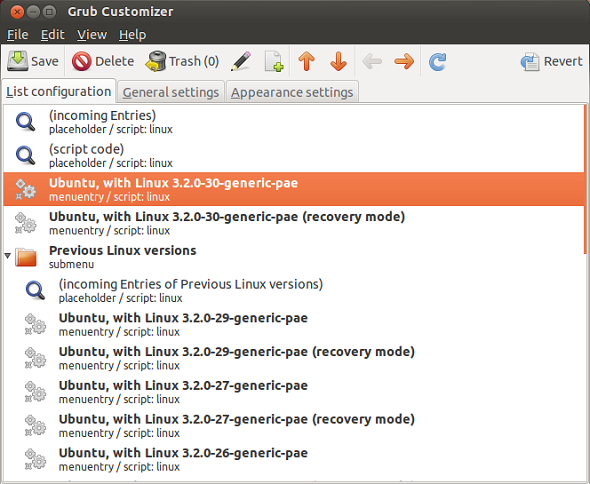
 GRUB Customizer, the program that lets you configure your boot menu (GRUB2 & Burg) has just been updated to version 3.0.

More about GRUB Customizer can be found on this page.

This program helps you order and edit your boot menu entries, change boot menu color and background and many others.

This brief tutorial is going to show you how to install it in Ubuntu 12.04, but it can also work in 12.10, 11.10, 11.04, 10.10, 10.04.

Objectives:
  • Install GRUB Customizer in Ubuntu 12.04 (Precise Pangolin)
  • Enjoy!
To get started, press Ctrl – Alt – T on your keyboard to open the terminal. When it opens, run the commands below to add its PPA.
sudo add-apt-repository ppa:danielrichter2007/grub-customizer

grub_customizer_precise_2

Finally, run the commands below to update your system and install GRUB Customizer
sudo apt-get update && sudo apt-get install grub-customizer

grub_customizer_precise_1

After installing, go to Dash and search for GRUB Customizer and launch.

grub_customizer_precise

Intel Linux Graphics Installer Updated With Deb Package Support


Intel Linux Graphics Installer which allows you to install the latest graphics and video driver for your Intel graphic hardware was recently updated to version 1.0.2 with support for deb package installer. This means, the driver package can be downloaded and easily installed via apt-get commands.
This brief tutorial is going to show you how to easily install it in Ubuntu. Installing the graphic stack allows the best user experience with Intel graphic hardware when using Linux operating system.
The latest package version (2013Q2), improves performance, fixes bugs, and introduces new hardware-accelerated media encoding formats and video processing features. For more about this release, check out its release notes’ page.
Unlike in previous releases where one must first add the software’s repository key and install its repository before install the driver, the deb installer makes it easy. It automatically installs the repository and its key and make it available via software center for easy upgrade to feature releases.
Some of the new features and/or bug that were fixed are listed below:
  • hotplug improvements
  • DDI code cleanup
  • Dynamic power well support for Haswell
  • Preserve lane reversal bits on DDI/FDI ports
    • Prevent Glamor from crashing if misconfigured.
    • Scaling on Intel® IronLake, SandyBridge, IvyBridge and Haswell.
To get started with installing the package, press Ctrl – Alt – T on your keyboard to open the terminal. When it opens, run the commands below to download 32-bit version of the installer.

wget https://download.01.org/gfx/ubuntu/13.04/main/pool/13.04/i/intel-linux-
graphics-installer/intel-linux-graphics-installer_1.0.2-0intel3_i386.deb

To download the 64-bit version, run the commands below
wget https://download.01.org/gfx/ubuntu/13.04/main/pool/13.04/i/intel-linux-
graphics-installer/intel-linux-graphics-installer_1.0.2-0intel3_amd64.deb

After downloading a version for your system, run the commands below to install it.
sudo dpkg -i intel-linux-graphics*.deb && sudo apt-get install –f

That’s it!
Now, there have been instances where users have run into trouble after installing the driver. So, before installing it make sure to backup your machine and settings. Here’s a forum that may help you in case you run into issues.

Enjoy!

intel-graphics-installer

Friday, July 5, 2013

The everything phone for (almost) everyone


samsung-galaxy-s4-xl

The good: The Samsung Galaxy S4 has Android 4.2.2, a fantastic camera, a powerful quad-core processor, and software solutions for just about every scenario -- including working as a TV/DVR remote. It's also comfortable in hand and has NFC, a user-replaceable battery, and a microSD storage slot.

The bad: Its screen is dimmer than competitors', its plastic design gives it a cheaper look than its rivals, and we found the Galaxy S4's power button turned on at undesirable times. Not all camera modes work as promised, and a long list of software features can quickly overwhelm and confuse.

The bottom line: Its laundry list of features require time and effort to truly master, but the Galaxy S4 is the top choice for anyone looking for a big-screen, do-everything smartphone.


Samsung Galaxy S4


GENERAL 2G Network GSM 850 / 900 / 1800 / 1900
3G Network HSDPA 850 / 900 / 1900 / 2100
4G Network LTE (market dependent)
SIM Micro-SIM
Announced 2013, March
Status Available. Released 2013, April
BODY Dimensions 136.6 x 69.8 x 7.9 mm (5.38 x 2.75 x 0.31 in)
Weight 130 g (4.59 oz)
DISPLAY Type Super AMOLED capacitive touchscreen, 16M colors
Size 1080 x 1920 pixels, 5.0 inches (~441 ppi pixel density)
Multitouch Yes
Protection Corning Gorilla Glass 3
  - TouchWiz UI
SOUND Alert types Vibration; MP3, WAV ringtones
Loudspeaker Yes
3.5mm jack Yes
MEMORY Card slot microSD, up to 64 GB
Internal 16/32/64 GB storage, 2 GB RAM
DATA GPRS Yes
EDGE Yes
Speed HSDPA, 42.2 Mbps; HSUPA, 5.76 Mbps
WLAN Wi-Fi 802.11 a/b/g/n/ac, dual-band, DLNA, Wi-Fi Direct, Wi-Fi hotspot
Bluetooth Yes, v4.0 with A2DP, EDR, LE
NFC Yes
Infrared port Yes
USB Yes, microUSB v2.0 (MHL 2), USB On-the-go, USB Host
CAMERA Primary 13 MP, 4128 x 3096 pixels, autofocus, LED flash, check quality
Features Dual Shot, Simultaneous HD video and image recording, geo-tagging, touch focus, face and smile detection, image stabilization, HDR
Video Yes, 1080p@30fps, dual-video rec., check quality
Secondary Yes, 2 MP,1080p@30fps, dual video call
FEATURES OS Android OS, v4.2.2 (Jelly Bean)
Chipset Exynos 5 Octa 5410
CPU Quad-core 1.6 GHz Cortex-A15 & quad-core 1.2 GHz Cortex-A7
GPU PowerVR SGX 544MP3
Sensors Accelerometer, gyro, proximity, compass, barometer, temperature, humidity, gesture
Messaging SMS(threaded view), MMS, Email, Push Mail, IM, RSS
Browser HTML5
Radio No
GPS Yes, with A-GPS support and GLONASS
Java Yes, via Java MIDP emulator
Colors White Frost, Black Mist
  - Wireless charging (market dependent)
- S-Voice natural language commands and dictation
- Smart stay, Smart pause, Smart scroll
- Air gestures
- Dropbox (50 GB storage)
- Active noise cancellation with dedicated mic
- TV-out (via MHL 2 A/V link)
- SNS integration
- MP4/DivX/XviD/WMV/H.264/H.263 player
- MP3/WAV/eAAC+/AC3/FLAC player
- Organizer
- Image/video editor
- Document viewer (Word, Excel, PowerPoint, PDF)
- Google Search, Maps, Gmail,
YouTube, Calendar, Google Talk, Picasa
- Voice memo/dial/commands
- Predictive text input (Swype)
BATTERY   Li-Ion 2600 mAh battery
Stand-by (2G) / Up to 370 h (3G)
Talk time (2G) / Up to 17 h (3G)
Music play Up to 62 h
MISC SAR US 0.85 W/kg (head)     1.55 W/kg (body)   
SAR EU 0.42 W/kg (head)     0.54 W/kg (body)   
Price group
TESTS Display Contrast ratio: Infinite (nominal) / 3.352:1 (sunlight)
Loudspeaker Voice 70dB / Noise 66dB / Ring 77dB
Audio quality Noise -95.9dB / Crosstalk -96.4dB
Camera Photo / Video